
Eighty per cent of my IT support is now done by an AI I built. It picks up the request, works out what's wrong, fixes it and emails the person to say what it found and what it did. A person handles the rest.
That's AI First Principles at work: AI first, human second. I've worked that way since 2020, and IT support suits it well, because a lot of the job is the same problems turning up again and again.

It works with ConnectWise, ScreenConnect and the rest
Underneath sits the kind of stack plenty of IT support firms already know: ConnectWise, ScreenConnect and a few other tools. The AI works with them, the same tools a technician uses.
If you run ConnectWise or ScreenConnect yourself, that's the bit worth knowing. AI can do real support work with tools like these.
How a job comes in
Two ways.
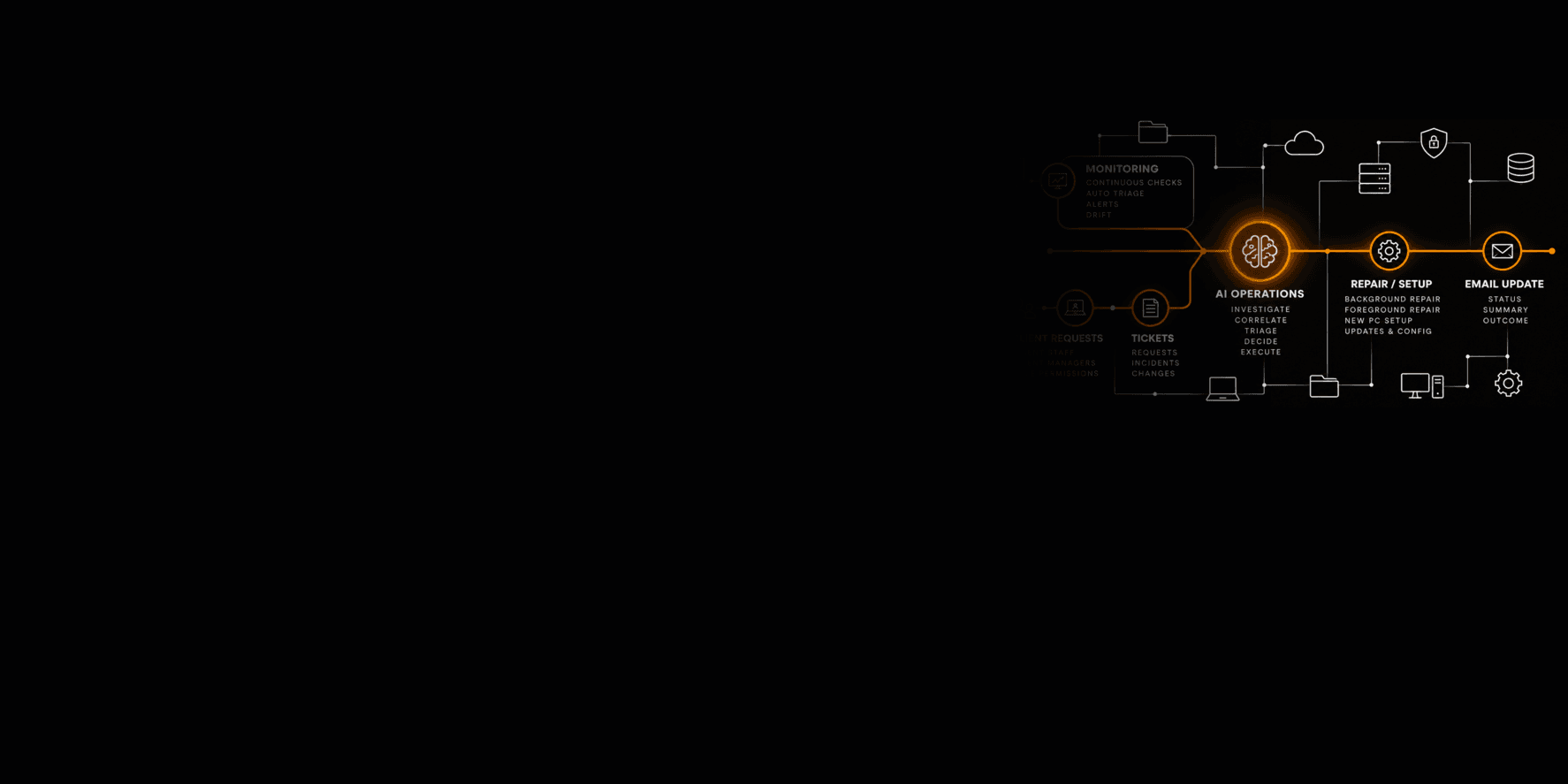
Someone asks. Client staff raise requests, and so do their managers. What each person can ask for depends on their role.
Monitoring catches it. Machines are checked continuously. The AI triages alerts as they arrive and watches for drift, where a machine's settings slowly wander from how they should be.
Either way it becomes a ticket: a request, an incident or a change.
What the AI does with it
Much the same as a good technician. It investigates, pulls the evidence together, triages, decides on a fix and carries it out.
Correlating is a big part of it. Three people with the same error on the same morning are usually one problem, not three.
Fixes that don't get in anyone's way
Some repairs run in the background while the person carries on working. Others need the screen, so they're done in the foreground in a remote session, the way a technician would do it.
It also sets up new PCs and keeps updates and configuration where they should be.
One rule it never breaks: it doesn't restart a machine someone is working on. A restart waits until the person has saved their work and said yes, or until nobody is using the machine. Losing an hour's work to a support tool would undo everything else it does well.
Everyone hears what happened
Every job ends with an email: where it stands, a short summary and the outcome. Nobody has to chase.
The other 20%
Some things still need a person. Hands on hardware, for a start. And anything that's really a decision about someone's business rather than a technical fix.
That's the human second part, and it's by design. The AI does the work it's good at and hands over the rest rather than guessing.
80% today. The aim is always more, as long as a person still gets the jobs that need one.
If you'd like your IT support to work like this, get in touch.